
Need help?
Welcome to our FAQ, feel free to browse the questions below. If you don't find your answer here, see other ways to get help.
Postcrossing: the basics
What is Postcrossing?
The goal of the Postcrossing project is to enable anyone to exchange postcards with random people around the world. That's using real mail, not email!
It goes like this: for every postcard you send, you'll receive one back from another random member — and the more you send, the more you will receive. It's that easy.
You can learn about far away places, different cultures, or even practice foreign languages. Postcrossing turns your mailbox into a box full of surprises!
How does Postcrossing work?
It's quite simple:
- Create an account on the website (it's free). You need to provide your address so that you can receive postcards back.
- Request to send a postcard. Postcrossing selects a random member for you to send a postcard to. Their address and some profile details are shared with you. A Postcard ID is also provided: that's an unique code (e.g. US-12345) that identifies the postcard that you are about to send.
- Write a postcard to that postcrosser and make sure to also write the Postcard ID on it. That's it — now all you need to do is post it just like any other postcard. Don't forget the stamps!
- The card arrives to its destination — hurray! The other postcrosser registers it, using the Postcard ID written on the card.
- Once a postcard you have sent has been registered, you'll be eligible to receive a postcard! It may take some time for it to be delivered, but as soon as your postcard is registered, another random user will send a card to you. Once you receive it, register it on the website, so they will be selected to receive one next!
You can send several postcards at once, and the more you send, the more you will receive back.
Make sure to read the Postcrossing Community Guidelines before you start exchanging postcards. If you still have questions, check out the FAQ.
Is Postcrossing free?
Yes! Signing up and using the random matching service that enables you to connect with other users is completely free. We believe this is the best way to allow more people from around the world to join the project, increasing the diversity of postcards sent and locations available to make it much more interesting for everyone! So go ahead and join us if you haven't yet!
However, you will have to pay for the postcards and postage! We'd love to be able to help with these costs, but it isn't feasible, so the costs of postage are on you.
Running the project does have costs for us, so this is why we display ads on the site. We also have an option which allows members to support us via voluntary contributions.
Is Postcrossing safe?
The privacy of your personal data, including your address, is important, so we designed Postcrossing to be safe. Here is what we do to keep your data secure:
- The addresses stored in Postcrossing are only used for the purpose of exchanging postcards in the project.
- It is not possible for anyone to intentionally get a specific address from the system. In Postcrossing, the destination of a postcard is selected randomly among all accounts in the system, so your address is shared only with the few selected members that will be sending you a postcard. To learn more about this, see how Postcrossing works.
- Any member can only request a small number of addresses from the system. This is by design so that no one can get all the addresses from our database. Several other safety measures are also in place to prevent this.
- All maps displayed in Postcrossing are only approximate and are not calculated from actual addresses. The coordinates used show the geometric center of the nearest large city, as selected by you in your account. The lack of precision is intentional and aims to protect your privacy.
- Your private data stored in Postcrossing is not sold or traded with third parties. No one will have access to your data without your explicit permission, as specified by our Privacy Policy.
- Access to Postcrossing's website is only possible over HTTPS. All communications transmitted between your device and our website are encrypted.
Please note that your address will be shared with the few members that will be sending postcards to you (as explained above), since that is the only way you can receive postcards. Also, the information you publish in your profile such as the about text and your Postcrossing username are public. Most profile fields are optional though, so only share what you're comfortable with.
If you wish to maximize your privacy, consider using a PO box in your local post office (or your work/school address) instead of your home address and avoid including a return address on the postcards you send.
Please read Postcrossing's Terms of Service and Privacy Policy for more information, and if you still have any questions, feel free to contact us.
Is Postcrossing suitable for collectors?
Yes, and no!
Yes, you can receive many postcards from all around the world. In fact, some postcrossers are longtime postcard and/or stamp collectors and their collections have become much more interesting by participating in Postcrossing.
But, no, the goal of this project is not for collectors to complete their collections. Postcrossing is more than just the postcards — we celebrate the diversity of our world through the postal connections enabled between two random people. Not knowing which postcard you will get or where it will come from is part of what makes the experience interesting.
So, if you are a collector you are welcome to join us! But, please keep in mind that:
- You cannot choose where your postcards will come from. That will be randomly selected by Postcrossing.
- You should expect to receive all kinds of different postcards, and these probably won't represent just the themes you're most interested in. You're welcome to describe what you're interested in via your profile, which we show to the members selected to send postcards to you, but the sender doesn't have to comply. You still have to register all postcards you receive, even if they don't match your personal preferences or taste.
- All postcards you receive will be written and stamped. Postcrossing is not to collect blank postcards as there is always some communication (in the postcard) from the sender to the receiver.
Postcrossing can transform your mailbox into a box of surprises: embrace the diversity and let yourself be surprised!
How many postcards can I send?
Initially, you can have up to 5 postcards traveling simultaneously. As time goes on, and you exchange postcards with other members of the website, the number of postcards that you can send will increase. These limits allow the system to remain secure while still encouraging new members to try out the project and allowing avid postcrossers to send more postcards if they want to.
Your limit will start to increase (from 5 to 6) immediately after your first 5 postcards are registered by their recipients. From then onwards, for every 10 postcards that you have sent, up to 35 sent, the number of postcards that you can send will increase by one. After that, for every multiple of 50 postcards (sent), you will be allowed to send one more.
In other words:- If you have sent between 0 and 4 postcards, you can send 5 postcards.
- If you have sent between 5 and 14 postcards, you can send 6 postcards.
- If you have sent between 15 and 24 postcards, you can send 7 postcards.
- If you have sent between 25 and 34 postcards, you can send 8 postcards.
- If you have sent between 35 and 49 postcards, you can send 9 postcards.
- If you have sent between 50 and 99 postcards, you can send 10 postcards.
- If you have sent between 100 and 149 postcards, you can send 11 postcards.
- If you have sent between 150 and 199 postcards, you can send 12 postcards.
- ... and so on, in increments of 1 postcard for each 50 you send.
This means that if, for example, you have sent 21 postcards, you can have at most 7 postcards traveling simultaneously to other members.
Once you have reached your account's limit, you are not allowed to send more postcards until one of your traveling postcards is registered by its receiver. If a postcard is not registered within 60 days, it will be marked as expired and its slot will then be freed.
The limit of postcards traveling at the same time stops growing at 100 postcards.
Note: These limits have been updated several times, and may be changed again in the future.
Sending postcards
How to write a postcard
Writing a postcard is quick and easy — grab a nice postcard, a pen and some stamps, and let's get started! Here's how postcards are commonly written:
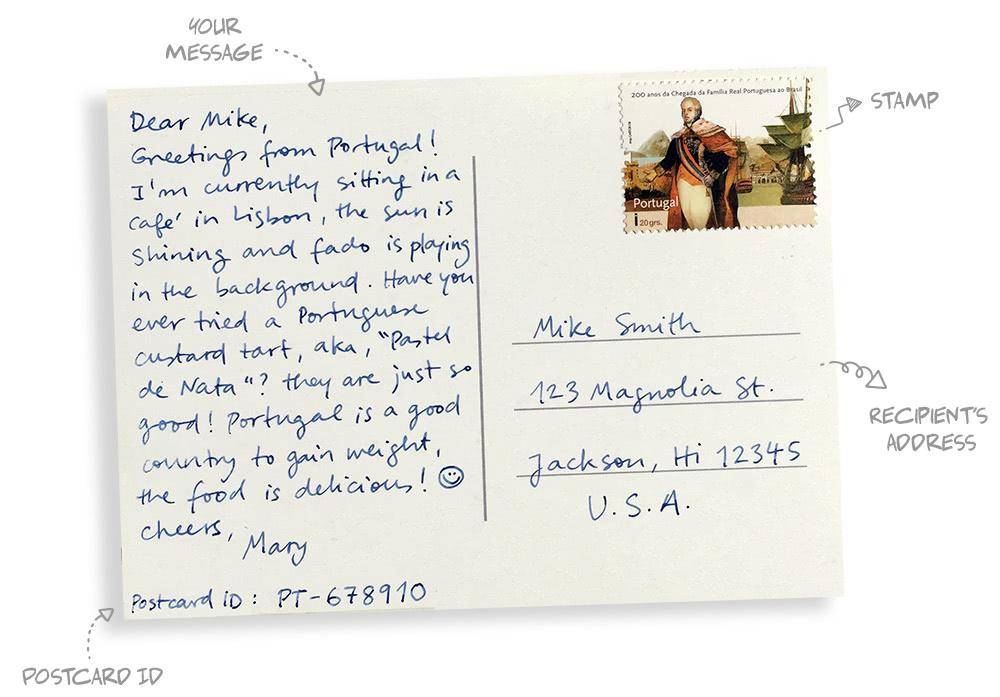
- Begin by writing your message to the recipient, which should take just the left side of the postcard. Write something cheerful about your day, your hobbies, the place where you are... or check out these writing tips for some inspiration.
- The stamps should be stuck in the top right corner of your postcard. If you're not sure how much postage to use, please check the correct amount with your post office.
- The recipient's address should be neatly written in the bottom right corner of the postcard. Write it as legibly as possible and in the correct format, so that it can be quickly processed and delivered.
- If this is a Postcrossing postcard, don't forget to write the Postcard ID on it too.
You don't need to write your address on the postcard, nor use an envelope to send it. Just drop it in a postbox or at your local post office, and that's it!
What is a Postcard ID and where can I get one?
A Postcard ID is a little code that uniquely identifies a postcard in Postcrossing. It is composed of two parts: two letters (the country code) and a number. For example: US-12345678.
To get a Postcard ID, simply request to send a postcard and the Postcard ID for that specific postcard will be provided to you. It is important that you always write on each postcard its corresponding Postcard ID — that is what allows the recipient to register it in Postcrossing.
Please note that only postcards exchanged through Postcrossing have Postcard IDs. Any direct swaps you engage in with other members do not have Postcard IDs, nor are they tracked by Postcrossing in any way.
Where do I write the Postcard ID?
For a postcard you sent to be registered, the receiver must be able to read its Postcard ID.
If you put it in an area where it might be read by mail sorting machines, it could be confused for a post code, which would delay its delivery. And if you write it too close to the stamp area, it might be stamped over, causing the receiver some problems deciphering it!
Here are some do's and don'ts for writing the Postcard ID:
DO:- do write it clearly, and use large letters/numbers
- do write it on the left half of the postcard (direction of text is unimportant)
- do write it more than once on the postcard
- do double-check that you wrote it correctly
- don't write it under, above or to the right of the address
- don't write it next to the postage area
- don't write it with ink that smudges easily
What should I write on a postcard?
Although quite small, the space on the writable side of a postcard can often seem intimidating, and some people struggle with what to write there... To help with this, here are 20 different ideas to fill your postcards:

- Express what daily life is like where you’re sending the card from by describing what you did today, your routine, etc.
- Write 5 curious facts about the place where the card is from.
- Give local traveling tips from your area! What are the must-sees around you?
- Include your favorite quote, perhaps in its original language (with translation!)
- What was the last thing you cooked or ate? Include a recipe!
- What do you have in common with the recipient of your card?
- Recount a childhood memory, or something you've learned from your grandparents.
- What makes you happy? If it makes you smile, there are a good chances others will like to hear about it.
- Share a local idiom or saying, in its original language, with translation of course!
- Did you ever travel to the place where your card is going? Recall your best memory of that place.
- What's the weather like as you are writing your postcard? Draw the weather forecast in detail, and don't forget to include the temperature!
- Share an interesting fact that you've learned recently, and which most people are not aware of.
- Got an unusual hobby or collection? Do tell!
- Did anything important happen in your country lately? Share an interesting news tidbit!
- Write about your favorite book, movie or band.
- Draw a picture of your surroundings, or your favorite object in that room.
- Write your favorite poem or…
- ...make up your own poem! Acrostic poems or haikus are short and enjoyable to write.
- What are the local festivals or traditions from your area?
- If you're a student, what are you studying? What was the last thing you learned in school?
If you need further inspiration, every month Postcrossing suggests a different writing prompt on the blog — check them out!
PS — Always remember to clearly write the Postcard ID that is provided to you. The Postcard ID is the only way the receiver can register your postcard on Postcrossing.
What language should I use?
English is probably the safest option. When you receive an address to send a postcard to, you will also receive a list of languages that the recipient understands. If you speak one of those languages, you can also use it on your postcard.
What can I send on Postcrossing?
Postcrossing is a postcard exchange community, so each exchange that you make must include at least one postcard. It can be a postcard you bought in a store or a handmade postcard, as long as it hasn't been previously used.
If you want, you can also send other things with your postcard (for instance, a letter, photo or pamphlet). However, this isn't required nor expected of you: the only thing you have to send in Postcrossing is a postcard.
What if the postcards do not arrive or are not registered?
Luckily, this doesn't happen very often! If a postcard you've sent is not registered within 60 days of being requested, it expires. The recipient can still register the postcard up to one year from the date it was sent, but in the meantime, you get an extra slot to send another postcard, if you'd like.
We understand that it's frustrating when one of your postcards doesn't reach its destination, but please keep in mind that the postal service is not 100% reliable. Sometimes, mail does get lost, mis-delivered or even accidentally damaged or destroyed. If you send many postcards in Postcrossing, this is likely to happen to you as well at some point — it's part of the postal experience and, unfortunately, Postcrossing has no control over it.
Also, sometimes members get sick, lose access to the internet, have to move suddenly, etc. and postcards end up getting lost. When a member doesn't log in for a long time, Postcrossing automatically sets their account to inactive, and sends them several emails about this issue. When there's clear evidence of wrongdoing or if the issue goes on for a long time, those accounts are automatically closed and all postcards traveling to them are registered.
Unfortunately, we do not have the resources to manually contact every member who stops registering postcards... so getting in touch about a specific postcard that got lost is not productive. :( We hope you understand that we cannot follow-up on every single expired postcard.
I forgot to write the Postcard ID on the postcard I sent
Don't worry, the receiver can still ask for help when they receive your postcard.
If you would like to make their life a little easier, just write them a private message to explain that they will be receiving a postcard without a Postcard ID, and include the Postcard ID in the message. Please note that the recipient can only register your postcard when it arrives in their mailbox.
Should I send my postcard in an envelope?
Postcards are usually mailed without an envelope. So, by default, if you're sending a postcard to another member, mail it without an envelope. Most members prefer to receive their postcards this way.
However, in some countries, postal services may require postcards to travel in envelopes, or there might be clear advantages to that method of sending them (protection from likely damage or curious eyes, etc.). Some members indicate this on their profile. If you can, try to follow the recipient's recommendations.
Keep in mind that in many countries, the postage is more expensive to send a postcard with an envelope than without it (plus the cost of the envelope). Both methods are acceptable, so it's up to you to decide how to send your postcards.
Why do I have so many cards traveling to the same country?
Did you accidentally select the option in your settings that says that you prefer to have several postcards traveling to the same country at the same time? That could be the reason! This option is not enabled by default, and if it is selected for your account, you must have turned it on at some point. It's ok to switch it off again, if you're looking for some more variety!
However, if you have not selected that option, please note that countries can still repeat. To learn more, read on.
As you probably know, some countries are a lot more active than others in Postcrossing, meaning they send much more than others... which means they have to receive many more postcards as well. This is why you might have more than one postcard going to a very active country.
What Postcrossing does is to try to maximize the number of different countries you are sending postcards to at any given moment. However, at some point, repetitions must still occur, in order to keep the system balanced.
Postcrossing allows repetitions to happen more frequently to members who are sending larger amounts of postcards at the same time, while being less common for those who can send less. Since those who can send more have (by consequence) a wider variety of different countries than the rest, we feel this is fairer to all.
If Postcrossing prevented any repetitions from happening, members in very active countries would be unable to receive the amount of postcards they were due — they would be sending, but not receiving! So repetitions are a requirement to keep the number of postcards sent and received in each country as balanced as possible.
Lastly, note that the amount of repetitions can and does change over time. Postcrossing dynamically adapts to the balance of each country at any given moment, and this is why you sometimes might see more or less repetitions.
What are expired postcards?
A postcard that has been traveling longer than 60 days is set to expired in Postcrossing. This status allows an account to send another postcard. You can see which of your traveling postcards have expired by looking at your traveling postcards page.
Most sent postcards will arrive well before 60 days have passed; however, some postcards do take longer to reach their destination. Expired postcards can still be registered up to one year after you requested the address. After this period, they are deleted from Postcrossing and can no longer be registered.
Can I send a postcard after it is already expired?
Yes, you can. We know that sometimes life gets in the way and postcards do not get sent out in a timely manner. You can still send the postcard late — just make sure that your postcard will arrive within one year of the date you requested that address. Once the recipient gets the postcard and registers it, that card will be counted like any other postcard you have sent.
Should I write my address on the postcards I send?
No, you don't have to. You can always exchange addresses after a postcard is received, through private message.
I mailed the postcard! How do I mark it sent?
Postcrossing does not record the actual date of mailing. Instead, a postcard's sent date reflects the date that the address was requested which usually coincides with the date the postcard was mailed, simplifying the Postcrossing process. Please note that a postcard must be received and registered for your Postcards Sent total to increase.
I lost an address, how do I get it again?
You can always see the address of your traveling postcards directly on your Traveling postcards page. Simply follow the link in each Postcard ID to be shown its address again. Once a postcard has been received and registered, you will not be able to view the address anymore.
Every time you request an address, you also receive an email with all the information about that postcard, so be sure to check your inbox. If you're having trouble receiving emails from Postcrossing, see the FAQ on email problems.
Should postcards be sent via registered mail?
We don’t recommend that.
Postcrossing is designed for ordinary letter-post. While registered/trackable services can be more reliable, they’re usually more expensive and often inconvenient for the recipient (as someone has to be home to sign during working hours, or make a cumbersome trip to the post office to pick it up). Registered mail may also trigger extra handling — and, in some countries, unnecessary customs checks or even additional fees.
All this extra fuss can turn a simple, joyful postcard into an errand... so we discourage the use of registered mail in Postcrossing.
Receiving postcards
What do I do when I receive a postcard?
First, congratulations if this is your first Postcrossing postcard — hopefully many more will follow!
When you receive a postcard from another member, you must register it on Postcrossing. To do that, you need to go to the register a postcard page and enter the Postcard ID. Just look in the text written on the postcard and you should find an alphanumeric code starting with two letters (the country code) followed by a number — this is the code that uniquely identifies that postcard in Postcrossing.
Once you register that postcard, it will make the sender be the next person to receive a postcard from someone else in the system. That's it! Simple, right?
If you have problems reading the Postcard ID written on the postcard, don't give up! Feel free to try as many combinations as possible, as only the right combination will be accepted. However, if you are still unable to register it or if the sender forgot to write the Postcard ID, don't worry — we can help!
What do I do if I receive a postcard without or with the wrong Postcard ID?
We can help! Simply use the “request help to find an unknown ID” form and we’ll do our best to help you find the right Postcard ID. By the way, you can find the form from the side column on the register a postcard page as well.
On that page, please enter as much information as possible even if you are not sure about it. Sometimes if there is very little information, a visual description of the image on the postcard can help, since we can compare it with an image the sender might have previously uploaded to the website.
 For instance, if you received the postcard on the left, a good description would be that it features "A row of three lighthouse pictures, of which 2 are white and the middle one is red". Don't describe the decorations on the postcard or tell us the author of the photo, as that won't be very useful.
Note that the postal cancellation mark often displays the date and postal code/city, so please add those as well. We'd try to find it for you using the information you provide, so the more details you submit, the more likely it will be found.
You only need to fill out a request once for each postcard. If you make a mistake, please delete the request and enter a new one. It can take several days for a match to be found. Please be patient.
Additionally, if you find the Postcard ID and register the postcard before you receive a response, please delete the request. You can delete it by using the delete button for the request on your "Received postcards" list.
Also, please consider the following:
- Are you 100% sure the Postcard ID is not written somewhere in the postcard? Check for any numbers (even if without the country two letter prefix), or in places like right above/under your own address.
- Make sure that the postcard is an official Postcrossing postcard and not a thank you postcard or a direct swap.
- You can try to enter Postcard IDs many times without consequence. So, why not try a different combination? For instance, sometimes 1's can look like 7's, 3's and 5's can look like 8's, etc. Don't worry, the Postcrossing system will not let you register a postcard that does not belong to you.
- If the postcard has information about the sender, you can use those hints to search for the user in our search users page and then try to contact them by private message.
- Note that postcards with Postcard IDs over one year old cannot be registered.
Why am I not receiving postcards?
Here are some common reasons that might explain why you're currently not receiving postcards:
- You have already received as many or more postcards than you've sent.
- Your account is set to inactive (which means, it's not being selected to receive postcards).
- You lost a large amount of postcards at a given time in the past (e.g., holidays, moving, mail delivery not working as expected).
- Your address is incorrect or incomplete.
If you're a new member of Postcrossing and are expecting your first postcard, please know that Postcrossing is not a quick hobby. Postcards from faraway countries can take several weeks to reach your mailbox, and in the beginning this might cause some frustration. Just keep calm and keep an eye on your mailbox! They should be there soon.
If you're a more seasoned member of Postcrossing and none of the reasons above apply, please contact your building's manager, your neighbors and the local post office to try to find where the postcards might be. If you find that your address might not be reliable, consider using a different address or PO box for your Postcrossing activities.
Why do I receive more postcards from a certain country?
Probably because that country has many more active members (sending many more postcards) than other countries.
If you're curious, you can explore Postcrossing's members geographical distribution on this page: https://www.postcrossing.com/explore/countries
For a more balanced distribution of members and postcard origins, consider inviting some of your friends to the project. This way, a better balance can be achieved without being unfair to countries where Postcrossing is popular.
Why have I received more postcards than I have sent?
The algorithm for selecting addresses is complex and there are instances when your address will be selected a bit more often than you expect. Count it as an early bonus — your sent/received numbers will even out in the long run.
Can I see the registration messages of my exchanged postcards?
Registration messages are sent directly to your email address, so check your inbox to see if one of your postcards has been registered. You can find any message the recipient chose to send in that email!
Using Postcrossing
How do I send a message to a member?
You can send messages to other Postcrossing members through the Send a message! link on their profile page. You can find it just above the member's About text.
All messages are sent to the recipient's email address. To reply to a message you've sent, the member must access your profile page and repeat the process. In this manner, email addresses are kept private.
Keep in mind:
- Be polite and use common sense.
- Do not send direct swap requests to people who have indicated that they do not want to engage in such activities. You will see a helpful reminder below the subject box when the member has chosen not to engage in private swaps.
- To prevent spam, the number of messages you can send in one day is limited.
If you are not receiving messages from other members or Postcrossing, please check the FAQ for email problems.
Can I choose the country which I will exchange postcards with?
No, that is not possible. Addresses are chosen randomly from all countries participating in the project — including your own, if you choose that option. Postcrossing is about randomness of connections and serendipity. If you prefer to choose a specific country to send or receive postcards from, consider organizing direct swaps.
What is the Travel Mode?
The Travel Mode is a setting that members can use when they're traveling and would like to send postcards from their travel destination.
To use it, simply set your account to Travel Mode on your Account Settings, choosing your destination country and city. Then, just use the website as normal! All the postcards you send while in this mode will have your travel country/city as their origin, so that their maps and statistics are correct. If you're traveling abroad, the Postcard IDs will also be from your travel country — but you'll need to physically be in that country in order to request addresses, so that we can check that your location is a match.
Please note that while you're in Travel Mode, your account will not be selected to receive postcards (since you're not home to receive them). All your due postcards will be sent to you when you are back home and set your account back to Active.
If you're using your mobile's data to access the internet abroad, please be aware that your traffic may be routed through your home country's servers... thus making it impossible for Postcrossing to verify your location. If this is the case, we suggest connecting to a local wi-fi instead (for instance from your hotel, or a nearby café). If you're traveling to a very small country or territory that might not have a national network connection (e.g., Vatican), please get in touch with us before your trip, so we can help.
How can schools participate in Postcrossing?
Although Postcrossing was not made with schools in mind, we think the project can be a wonderful tool to help students discover the world and practice their language skills.
We don't have special accounts for teachers or schools though: all accounts are the same in Postcrossing. So if you're a teacher, you can just go ahead and open an account for your class, fill out the profile and start sending postcards!
Here are some examples of classes registered on Postcrossing:
And you can read more about Postcrossing's experience in a school context on our blog.
We would advise you to mention on the profile that the account is for a class, so that members are sure to send appropriate cards. If the class has special wishes for what you'd like the children to receive or learn about, make sure to mention them as well — many members would probably be happy to accommodate your wishes.
That's it! If you have any questions on how Postcrossing works or need further help, feel free to get in touch!
My postcard should have already been received! What should I do?
You should wait, and try to be patient. Postcards can take longer than you expect to arrive, and there are several things that can delay a postcard's registration, such as:
- slow postal services
- the recipient of your postcard is on holiday or temporarily away
- the recipient does not have an internet connection at home
- the recipient did not understand your handwriting and is trying to figure out the Postcard ID
- the recipient is not able to check (or does not receive) their mail daily
Traveling time depends on the postal system of the respective countries so while some postcards may arrive after a few days, it is not uncommon that postcards take over a month to arrive. If a long time has passed (i.e.: more than a month) since the date in which you've mailed your card, you may try to contact the recipient through private message to ask whether the postcard has arrived (the ID might be blurred, illegible, etc.). Please note that you cannot ask members to register your postcard before it arrives in their mailbox.
After 60 days, unregistered postcards will be set to expired status and you will be able to request another address.
Experienced postcrossers will quickly advise you to be patient — it works!
How does the inactive state work?
When your account is set to Inactive, Postcrossing will not select your address to receive postcards. As soon as you set it back to Active again, you will receive all postcards that your account should have received during that time.
So if you know you are going to be away from your address for more than a week (for example: on holidays, a business trip, etc.), you should set your account to inactive (on your account settings) in advance, so that postcards stop being sent to you. This way, other members will not be kept waiting for a long time to have their postcards registered.
You can still send postcards while your account is in the inactive status — Postcrossing will just hold back sending you cards until you're ready to receive them.
Can I specify which cards I want to receive?
No. Postcrossing is not a collector's website, and your profile should be used to write about yourself, as stated in Postcrossing's Community Guidelines.
You can indicate some of your preferences, which can help other members pick the postcard they're going to send you. However, this does not necessarily guarantee that they can or will fulfill your preferences... ultimately, it's up to the sender to decide which postcard they'll mail you.
Please keep in mind that you must still register all postcards that you receive, regardless of whether they match your preferences or not. Stating in your profile that you will not register a certain type of postcard is against Postcrossing's Community Guidelines.
How can I help Postcrossing balance the very active countries?
In Postcrossing, those who send postcards also need to receive them. Naturally, very active countries need to receive postcards back in the same quantity that they send... which means that countries with less activity have to send postcards to the most active countries more often than to others.
Postcrossing is aware of this fact and aims, whenever possible, to maximize the number of different countries a member is exchanging postcards with. When this ideal scenario is not possible, it allows some repetitions to occur so that members always receive postcards back in the same amount they've sent.
There are a few actions that you can do to help Postcrossing reduce this problem, such as inviting your friends in less active countries to join the project. By increasing the number of postcrossers in other countries, the weight of the most active countries decreases, making the system more balanced globally.
Another way to help is by activating the option in your profile that allows for more country repetitions when you're sending postcards. With this option switched on, when you request a new address, Postcrossing will not try to select a country that you are not currently exchanging postcards with. This way, you will start to send more postcards to the most active countries, thus helping Postcrossing to balance the different weights of each country.
Not all postcrossers are equal though, and you might prefer to send postcards to as many different countries as possible — that's ok too! The option to send to repeated countries is switched off by default, and you shouldn’t feel you have to enable it. You can select it only temporarily to experiment with, or keep it on (or off) for a longer period of time. Either way, it's up to you. Note that this only changes the destination of your postcards — it does not change where the postcards you receive will come from.
If you have any questions about this, feel free to contact us.
Accounts and profiles
What should I write on my profile?
Your Postcrossing profile is the place where other postcrossers can get to know you a bit better. The more interesting you make it, the more enjoyable the experience on the site will be — both for you and for them. Make sure to write it in English, so that everyone can understand you.
Not sure what to write on your profile? Here are some ideas to get you started:
- Please introduce yourself, as if you were talking to someone you had just met.
- What is it like where you live? Is there something your town or city is famous for?
- Do you have any interesting hobbies or play a sport?
- Tell postcrossers about your favourite book, music genre, movie, food or a quote.
- What are you especially passionate about? What is the one subject you could talk about for hours?
- Are you currently learning a new skill or language?
- What is your secret hidden talent?
- Tell others something about your job, or what you're currently studying.
- What is your greatest achievement so far? What are you aiming for?
- Talk about your role models — who inspires you?
- What are some of the things that make you smile or laugh?
- You'll be receiving postcards from many different places around the world... what are you most curious about these places? What would you like to learn from other people?
And last but not least, make it fun! :)
Can I have more than one account?
Postcrossing does not welcome multiple accounts per person. The project is designed with safety and fairness in mind and for that, certain limits have been applied to each account. By having more than one account, those restrictions no longer apply, creating several problems for other members and for Postcrossing as well.
For example, we can no longer make sure that any two people do an exchange only once, and it is harder for a receiver to know which account they should register a postcard with, etc. It also creates imbalances in the address selection system, which is unfair to other members.
We do understand that members are very enthusiastic about participating in Postcrossing (and we love that!) and that sometimes they would like to send and receive more postcards than our system allows them to with a single account — which is why the limit of postcards each account can send at the same time increases over time.
For any postcrosser wishing to exchange more postcards than their own account allows, we recommend to:
- Organize direct swaps with other members. Or, do other types of postcard exchanges on the forum, where many other members would be happy to exchange with you.
- Be a little bit more patient! The amount you can send at the same time will increase, and soon enough you will find that you can send more than you can handle (or afford).
We occasionally tolerate that one person holds more than one account if within a reasonable amount, and only if we see strong evidence of proper usage. But, we still do not welcome such practices and we strongly discourage anyone from doing it. Postcrossing monitors the project for multiple accounts held by a single person, and we reserve the right to delete any such accounts without warning.
How can I change my profile text, photo or address?
You can change all your details (including profile text, avatar, account options and address) on your Settings section.
The link to it can be found on the top-right corner of the website, next to your photo!
Is my address displayed on the map on my profile?
To protect your privacy, the maps in Postcrossing do not use your actual address. All maps on the website use the coordinates of the center of the nearest city, as selected by you in your account.
All postcrossers in the same city are shown on the same coordinates.
I'm moving. How do I update my address?
If you're moving to a different address soon, it's a good idea to set your account to inactive some time in advance, so that postcards stop being sent to your old address.
Once you're settled in your new home, update your address in your account, including the City/Place, if it has changed. If you had set your account to inactive, you can switch it back to active again.
Keep in mind that postcards may still arrive to your old address after you've moved... so, it might be a good idea to check it now and then.
PS - For moves or trips that last less than 60 days, please check out the Travel Mode.
Can I change my username?
Yes, you can! You can change your username in your Account Settings section. Note that you are limited to only 2 changes, so choose wisely! Changes of case (uppercase to lowercase or vice-versa) do not count as a change. In other words, changing from 'paulo' to 'Paulo' will not count as a change.
Once you change your username, all mentions of your previous username will be updated to the new one.
Please note that some pages in the website are cached and until it expires your previous username may still show for a little while, but following the links will still reach your profile page. Also, search engines (e.g., Google) may take a while to update their indexes with the changes.
What is a Postcrossing Ambassador?
A Postcrossing Ambassador is a member who has made a remarkable contribution to the project, including things like:
- Writing an article about Postcrossing for a popular newspaper or magazine;
- Giving an interview to a radio or TV channel about the project;
- Giving a seminar or presentation about the project to a large group of people.
If you have done any of these (or other) good deeds, let us know. We'll be happy to review your application and if accepted, you'll even get a small Ambassador badge
 added to your profile!
Please understand that we receive many requests to become Postcrossing Ambassadors for writing about Postcrossing in personal blogs or websites. Currently we are not considering these eligible, unless some proof is provided of having a very large audience.
Tip: If you put your mouse over the words "Postcrossing Ambassador" on a member's profile, you can learn about that person's contribution!
How do I upload, change or delete my avatar (profile photo)?
To upload or change your avatar (that's your profile picture or photo!), you need to:
- Verify that you are logged in to your account.
- Go to the Settings (the link to this section is on the top right corner of the site, next to your profile avatar), then choose the Avatar section.
- Choose your avatar image from your computer.
- Use the Upload button and wait. It may take a few seconds for your image to upload.
- Now you'll need to crop your image. You can change the size of the crop area by dragging any one of the eight handles (small squares around the image). A preview of what your image will look like cropped appears to the right.
- Once you are happy with the preview, use the Crop button.
That's it!
To delete your avatar, go to the Settings page again, and use the Delete current avatar link, under your existing avatar.
Please make sure that you own the copyright to the image that you're uploading. Pictures that you took yourself make perfect avatars! Images must be in either the jpg or png file format and be larger than 140x140px.
What is profile visibility?
On your profile settings you can choose whether your profile page is visible to anyone or only to members (i.e., people that have a Postcrossing account).
If you want to share your profile page with friends who don't have a Postcrossing account, then you should select 'Anyone' so that they can see it. However, if you prefer that it is only visible to postcrossers, select 'Only to members'.
Please note that your username and avatar may appear in other parts of the website, as this setting only applies to your profile page. Moreover, it's important to be aware that making your profile visible only to members does not make it truly private, since anyone can create an account in Postcrossing.
Therefore you should only include in your profile what you feel comfortable sharing with others.
Why do some members have a list of expired Postcard IDs on their profile?
Some members post a list of expired postcards on their profile to keep track of the cards that never reached their destination.
We don't encourage this practice, as most of the time, the members who will be reading your profile are those who have been assigned to send you a postcard... and they get no valuable information from reading a list of your expired postcards. Your profile should be about you.
Even if by chance the recipient sees their username and a Postcard ID on one of these lists, they should not register that postcard if it did not arrive.
Keep in mind that mail can be unreliable and sometimes postcards do get lost, are mis-delivered or accidentally damaged during their journey. If you have contacted the receiver and they say it didn't arrive, consider sending a second with the same Postcard ID — it's quite common that a second attempt changes an expired postcard into a registered one.
If you'd like to see a list of your expired postcards, you can do so on your Traveling Postcards page. Please note that postcards which have been traveling for longer than a year are removed from Postcrossing's database, and can no longer be registered.
Help! My account is blocked from sending postcards!
If the majority of the postcards sent to you (or by you) are getting lost, Postcrossing might temporarily block your account from exchanging more postcards until the situation returns to normal. If this happens, we recommend getting in touch with your building's manager, your neighbors and the local post office to sort out the cause of the issue as soon as possible. If you believe your postal service is not delivering your mail promptly, we encourage you to write a formal complaint so that they can investigate the issue.
Please note that any problem with your account impacts not just you, but also all the people exchanging postcards with you... so it's important that any issues that interfere with your ability to send and receive mail are addressed promptly.
Rest assured that as soon as the problem is fixed, your account will be automatically unblocked.
PS - If you've found the reason why postcards were getting lost on their way to you but it's impossible for you to get the postcards back, please get in touch to see if we can help.
How do I quit?
We're sorry to hear that you'd like to leave! If you just wish to take a break from Postcrossing, you don't need to terminate your account. Instead, just set your account to inactive. When you are ready to come back, just switch your account status back to active, and voilà!
If you are sure that you want to terminate your account, log in with your username and password and go to the Terminate Account page. Note that once you close your account, it's unlikely we will be able to recover it.
The website
Why am I not receiving emails from Postcrossing?
Don't panic! :) Some email servers wrongly consider email sent by Postcrossing to be spam and discard it. This is beyond our control, but there are several things you can do to try to fix this issue:
- Check your email account Junk/Spam folder for expected email. If you find our emails in there, try to mark them as "Not spam" if you can.
- Make sure your email account has enough free space to receive email.
- When possible, add @postcrossing.com (and/or no-reply@postcrossing.com) to your list of safe senders or contacts, to prevent it from being considered spam.
- Change your email address to one with a different provider. Gmail is known to work and the accounts are free.
- Check your anti-spam filter. If you are using an anti-spam filter that requires senders to manually confirm that they want to send you a message, you might want to disable that for emails sent from the postcrossing.com domain.
- If you are using an email address that forwards your messages to a different email address, that may cause issues with receiving our emails. We use an email standard that minimizes spam abuse and email impersonation, but some email providers do not implement this standard and may forward our emails in an incorrect way. If you use email forwarding and are having trouble receiving our emails, try using the final email address instead of using the forwarding one.
If following the suggestions above does not solve your problem with receiving Postcrossing's emails, get in touch and we'll try to help you.
Note: You can always retrieve addresses for your traveling postcards on the Traveling Postcards page.
How do I access my messages?
There is no messages' inbox on the Postcrossing website. All private messages in Postcrossing are sent directly to the recipient's email address.
If you are not receiving messages from other members, a copy of your sent message, or other emails from Postcrossing, check the FAQ entry for problems with emails.
There is a country in Postcrossing that is not a real country!
Postcrossing follows the ISO standard 3166 for the 2-letter country codes used in the Postcard IDs. This ISO standard covers not only sovereign countries, but also dependent territories and regions of special interest.
Taiwan, Macao, Hong Kong, Åland Islands, Wallis and Futuna, Cayman Islands, Christmas Island etc. all fall into this category.
Will the website be translated into other languages?
No, not any time soon. For Postcrossing to work, there needs to be a common language among all participating members, so that they can communicate through the postcards they send and receive. In this case, English was chosen due to its widespread online usage.
If the website is translated into other languages, a member can sign up without sharing a common language with other members. This member would only be able to send postcards to those who speak their language... reducing the diversity that the project aims to provide. Hence, it is a requirement to be able to read and write basic English to participate in the project.
Is there a Postcrossing mobile app?
We know that the website is currently not very easy to use on mobile platforms — this is something we are improving and it is a priority for us. Making the website more mobile friendly (responsive) is taking us longer than we would like, but we are working on it. There will not be a mobile app, but we are aiming that the mobile version of the website will provide similar usability, while ensuring that the whole website functionality is always available on all mobile platforms (and not only some its features).
Postcards wall
How do I upload or delete a postcard image from the postcards wall?
If they wish to, postcrossers can upload photos of the postcards they've received, or photos of the postcards they're currently sending (but only while they're still traveling).
To upload a postcard image to your gallery, follow these steps:
- First, scan or take a photo of the image side of the postcard (not the one with message/address!)
- For a postcard you have received, go to your received postcards. If you wish to pre-upload the image of a postcard you are sending (i.e., that is still traveling), go to your traveling postcards instead.
- Find the row that has the Postcard ID for the image you would like to upload. Use the green '+' icon found in the last column of that row.
- Select the image you want to upload. For a postcard you have received, you can also enter an optional description text.
- Upload it and that's it!
Lastly, if you wish to delete a postcard image that you have uploaded, go to that postcard's page by selecting it from your received or sent postcards. Right below the postcard image there is a button to delete that postcard image.
Bonus question: Why can the sender only upload the image of a postcard while it is still traveling?
Every postcard's page in Postcrossing is shared between sender and receiver. If both sender and receiver could control the image upload simultaneously, this could cause a cycle of chaos with one person uploading, the other deleting, then re-uploading, deleting, re-uploading, etc.
To avoid this frustrating situation, only one person can upload a postcard's image at a time: before a postcard is registered, the sender can upload it, and after the postcard is registered, this responsibility passes to the recipient, who can choose to upload it. In a way, this control is handed over very much like the postcard itself is given from one person to the other.
Uploading the images is completely optional in Postcrossing, but if it's important to you that images are shown on your galleries, then please consider pre-uploading them while your sent postcards are still traveling.
The image of a postcard went missing from my postcard wall!
If you have pre-uploaded the image of a postcard that you have sent and it is no longer on your gallery of sent postcards, the most likely reason is that that image was deleted by the recipient. Recipients can choose to add, modify or delete the images of the postcards that they've received at their own discretion.
Since January 2014, the sender of a postcard can also delete a postcard image, if they were the original uploader of that image. If the sender of a postcard you've received deletes the image of that postcard, you will receive an email notification.
Lastly, Postcrossing's team may remove images that they deem to be inappropriate according to Postcrossing's Community Guidelines. If this was the case, you should receive a notification email from us.
A postcard image in someone's wall is inappropriate. How can it be removed?
If you find a postcard image that should be removed from a gallery, the first thing to do is to contact the recipient of that postcard and ask them to remove it. Please wait a few days for a reply since not every person uses Postcrossing on a daily basis.
If you don't get a reply, please get in touch about this issue. We will do our best to help.
How do I add or remove a postcard to/from my favorites?
It's actually quite simple! First, go to the postcard page by clicking on its Postcard ID. Underneath the postcard image, there's small heart-shaped button that you can use to add that postcard as a favorite.
To remove it from your favorites, just use the same button.
Other questions
What is the World Postcard Day badge? How do I get one?
By sending a postcard through Postcrossing on October 1st (World Postcard Day), you’ll earn a special badge on your profile when that postcard is registered. The more years you take part, the higher your badge number will grow.
To make sure no one misses out because of timezones, we count postcards requested on October 1st in either your local time OR in UTC (the timezone that the Postcrossing website uses). That means sometimes the date you see on the website might not match the date in your own country — but don’t worry! If it was October 1st where you live when you requested the address, your postcard still counts.
To keep things simple, all eligible postcards are marked with a little WPD red icon next to their Postcard ID on your Traveling Postcards page.
How many postcards can I send on World Postcard Day? Why is there a limit?
On World Postcard Day there is a limit to how many postcards each postcrosser can send. We set this limit because the pool of addresses available each day is finite, and without a cap we risk running out. This way, more people get the chance to participate and earn the World Postcard Day badge.
So, on October 1st, every postcrosser can send up to 10 postcards through the website. Here’s how it works:
- If you only have 2 slots available, you can send 2 postcards.
- If you have 5 slots available, you can send 5 postcards.
- If you have 10 or more slots available, you can send up to 10 postcards.
Remember that you only need to send one postcard on October 1st to receive the special badge (once it’s registered), so you don’t need to send your full allowance. Try to be mindful of others... and also of Paulo’s stress levels 😅.
Where can I buy postcards?
You can buy postcards in many different places! Following is a small list of locations where our members have found them for sale:
- Post offices
- Tourist information offices (or simply around tourist attractions)
- Museum and gift shops
- Stationery stores
- Book stores
- Newspaper or magazine kiosks
- Convenience stores (drug stores, supermarkets, department stores, truck stops)
- Airports
If you prefer to buy them online, Amazon usually has some good deals on postcard sets and boxes. We've highlighted some of them here and here.

If you have a knack for photography or design, you can also try making your own postcards and have them professionally printed.
Now and then, Postcrossing showcases online and offline stationery shops and postcard makers on the blog. You can find those posts under the tag stationery-shop. You will also to find banners on the website advertising several online postcard shops.
What are direct swaps?
Some members exchange postcards directly between them — we call those direct swaps. They are organized by the members themselves, often in the forum. Since they are not tracked by Postcrossing, they do not have Postcard IDs associated with them.
To help members know if another postcrosser is interested in direct swaps or not, we allow profiles to display that preference. This way, members who are interested in doing direct swaps are easier to find and members who do not wish to participate can clearly state so.
Please note that direct swaps are not an official Postcrossing activity. If you engage in a direct swap with another person, keep in mind that those are not monitored by Postcrossing in any way... so we will not be able to help you if you have problems with any direct swaps you participate in.
How do I find other members that want to swap?
If you want to organize your own direct swaps, you can find other interested postcrossers by using the search users page — just make sure to use the option to only show results with members interested in direct swaps.
Do not contact members about direct swaps if they have indicated they are not interested.
Also, one of the easiest way to find swap partners is to join the Postcrossing Forum which has an active postcard swapping community. On the forum, swaps are also referred to as trades. Find the appropriate trade section and read through the message threads or create your own.
How to become a supporter by bank transfer
Beforehand, thank you for your interest in contributing to this project!
To make a contribution to Postcrossing, we support several credit/debit cards, some popular payment wallets (e.g., PayPal, Apple Pay, Google Pay, Alipay) and, in some countries, also bank accounts. Please note that the payment methods offered depend on whether you select a one-time contribution or a recurring one, since most payment methods only support one-time payments.
If you are unable to use any of the supported payment methods, the only alternative is by international bank transfers to Postcrossing's bank account in Portugal, where the project is based. If you wish to use this option, please contact us for the required details. Please note that if you are not in an EU/SEPA country, international bank transfers may have associated fees for you, so we advise you to check with your bank first.
For the moment, we can not accept any other methods, such as checks, money orders or Western Union. All those usually carry heavy fees (reducing your contribution to almost nothing when it gets to Postcrossing) or require too much handling work for the amounts involved.
I made an error on my contribution to Postcrossing. Can you help?
If you have made an error in making your contribution to Postcrossing or if you had an automatic recurring transfer that you forgot to cancel on time, please get in touch within the following 2 weeks from the payment date and we'll see that it gets back to you. In such cases, the return is always made to the original payment method.
Can I send a postcard to the Postcrossing team?
YES! As you can probably imagine, we love postcards and receiving mail. So, if you’d like to send us a meeting card, show us a newspaper clipping or some cool mail-related item that you found, or just say hi using a postcard, feel free to do so!
Here's the address:
PostcrossingP.O. Box 216
EC Tavira
8800-999 Tavira
PORTUGAL
Now and then, we post about the lovely mail we receive on this forum topic.
P.S.: If you require an answer from us, the contact form is a faster way to receive a reply.
P.P.S.: If you are sending us something other than a postcard or a letter, please get in touch first.
I cannot find the answer to my question on the FAQ. What should I do?
If you have a general question about how something works, the fastest way to get help is by placing the question on the forum, where other experienced members may be able to help you faster than we can.
However, if you have a specific question or problem and are unable to address it on the forum, then get in touch and we'll do our best to help you.